peter (admin) -

Kubernetes NodePort Service
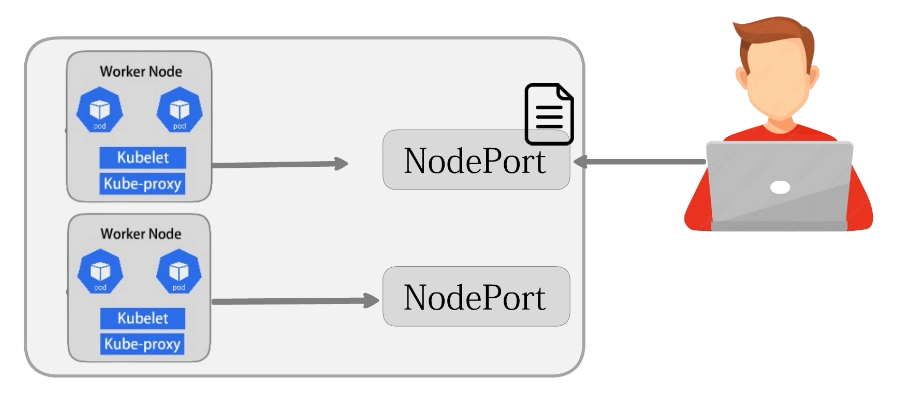 We will learn how a NodePort Service works in the Kubernetes networking system and how it allows external users to access an application running inside the cluster.
We will also learn how Kubernetes opens a specific port on each node so requests coming from outside the cluster can reach the backend Pods.
Let's get started.
For this, we are already logged into both the Master node and the Worker node.
Expose the Deployment Using NodePort
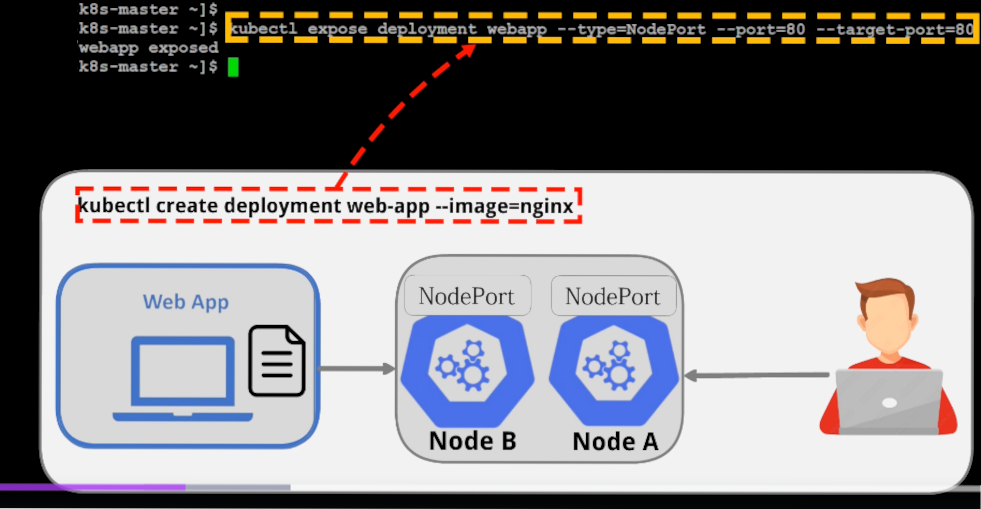
Let's move on and expose the deployment named webapp that we already created so it can be accessed from outside the cluster.
service/webapp exposed
peter@k8s-master:~$
Here we create a NodePort Service for that deployment, which means Kubernetes will open a specific port on each node and forward incoming requests to the Pods running the web application.
If you have not created the web-app deployment yet, first create it using the deployment creation command with the NGINX image.
After that, expose it through the NodePort Service so external users can reach the application through the node's IP address and the assigned port.
Verify the NodePort Service
Let's verify the Service.
NAME TYPE CLUSTER-IP EXTERNAL-IP PORT(S) AGE
webapp NodePort 10.100.157.226 <none> 80:31191/TCP 7m56s
peter@k8s-master:~$
Here you can see that the web-app Service is now running as a NodePort Service.
The output shows the ClusterIP, which is used for internal communication inside the cluster.
It also shows the NodePort number, which in this case is:
32274
The External IP shows none, which means Kubernetes has not assigned a public external address to this Service.
This is normal for a NodePort Service because NodePort does not create its own external IP address.
Instead, the Service is accessed using the IP address of any Kubernetes node together with the NodePort number.
For example, if the Worker node IP is:
192.168.2.98
and the NodePort is:
32274
then the application can be reached using:
192.168.2.98:32274
Kubernetes will then forward the request to the backend Pod running the application.
Test the NodePort Service Using Port 80
Let's move on and try to access the application from the Worker node to check whether the Service is reachable from outside the cluster.
Here we intentionally use port 80 instead of the NodePort number because we want to understand what happens when someone tries to access the node directly on the normal web port, even though the Service was exposed as a NodePort Service.
After pressing Enter, you can see that the connection fails.
curl: (28) Connection timed out after 10001 milliseconds
peter@k8s-master:~$
This means that the application is not listening on port 80 of the node itself.
This confirms that with a NodePort Service, external traffic must be sent to the assigned NodePort rather than to the normal port 80 on the node.
Access the Application Using NodePort
This time, we use the NodePort number together with the node IP address:
<!DOCTYPE html>
<html>
<head>
<title>Welcome to nginx!</title>
<style>
html { color-scheme: light dark; }
body { width: 35em; margin: 0 auto;
font-family: Tahoma, Verdana, Arial, sans-serif; }
</style>
</head>
<body>
<h1>Welcome to nginx!</h1>
<p>If you see this page, nginx is successfully installed and working.
Further configuration is required for the web server, reverse proxy,
API gateway, load balancer, content cache, or other features.</p>
<p>For online documentation and support please refer to
<a href="https://nginx.org/">nginx.org</a>.<br/>
To engage with the community please visit
<a href="https://community.nginx.org/">community.nginx.org</a>.<br/>
For enterprise grade support, professional services, additional
security features and capabilities please refer to
<a href="https://f5.com/nginx">f5.com/nginx</a>.</p>
<p><em>Thank you for using nginx.</em></p>
</body>
</html>
The request is now successfully reaching the application.
The output displays the default NGINX web page, which confirms that the request sent to 192.168.2.98 on port 31191 is correctly forwarded by Kubernetes to the backend Pod running the web server.
How a NodePort Service Works
This demonstrates how a NodePort Service allows external access to an application running inside a Kubernetes cluster.
The basic traffic flow is:
External Client
      ↓
Node IP : NodePort
      ↓
Kubernetes NodePort Service
      ↓
Backend Pod
      ↓
NGINX Application
For example:
192.168.100.189:32274
          ↓
     NodePort Service
          ↓
       Port 80
          ↓
     Backend Pod
          ↓
        NGINX
Traffic coming to the node's IP address and NodePort is routed through the Kubernetes networking system to the Pod running the application.
This is a simple explanation of how a NodePort Service allows external users to access an application running inside a Kubernetes cluster.
Comments (0)
There are no comments yet. Be the first to comment.
Log in or register to leave a comment. all comments are subject to admin approval