peter (admin) -

How Kubernetes Makes Decisions
Now it's time to understand how Kubernetes makes decisions.
Kubernetes does not guess, and it does not act randomly. Every decision is the result of defined components, stored state, rules, and continuous evaluation.
At the heart of this process is the declarative model.
The Declarative Model
Kubernetes works using a declarative approach. This means you do not normally tell Kubernetes how to perform a task step by step.
Instead, you describe what you want the final state to be, and Kubernetes determines how to achieve and maintain it.
For example, rather than manually starting three copies of an application, you can define that you want:
Three replicas of my application running.
This is known as the desired state.
Kubernetes then continuously works to make the actual state of the cluster match that desired state.
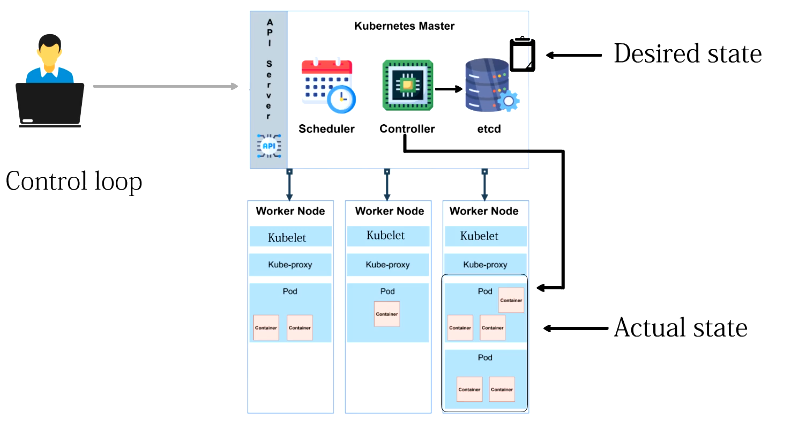
The API Server and Desired State
The API server is the central communication point for Kubernetes.
When a new Kubernetes object is created or an existing object is changed, the request passes through the API server.
The API server:
-
Validates the request
-
Authenticates and authorizes the requester
-
Applies admission policies
-
Records the resulting state in etcd
etcd is Kubernetes' distributed key-value store and contains the persistent cluster state.
At this point, Kubernetes has an official record describing what should exist in the cluster.
Controllers and the Control Loop
Once the desired state has been recorded, Kubernetes relies heavily on background processes called controllers.
A controller continuously compares two things:
-
The desired state
-
The actual state
This continuous comparison is known as a control loop or reconciliation loop.
The basic process looks like this:
Desired State
     |
     v
Controller
     |
     v
Compare
     |
     +---- Desired State == Actual State
     |              |
     |              v
     |          No action
     |
     +---- Desired State != Actual State
                    |
                    v
                Take action
If the controller discovers a difference between the desired and actual state, it determines that action is required.
A Simple Replica Example
Imagine that a Deployment specifies that three Pods should exist.
Kubernetes checks the actual cluster and discovers that only two Pods are currently running.
The desired state is:
Desired Pods: 3
Actual Pods:  2
Difference:   1
The appropriate controller detects the difference and works to create another Pod.
The controller generally does not directly start a container on a worker node. Instead, it updates Kubernetes objects through the API server, allowing the other Kubernetes components to perform their responsibilities.
The Scheduler Makes Placement Decisions
When a Pod has been created but does not yet have a node assigned to it, the Kubernetes scheduler becomes involved.
The scheduler watches for Pods that are waiting for node assignment.
It then evaluates the available worker nodes.
The scheduling process can broadly be divided into two stages:
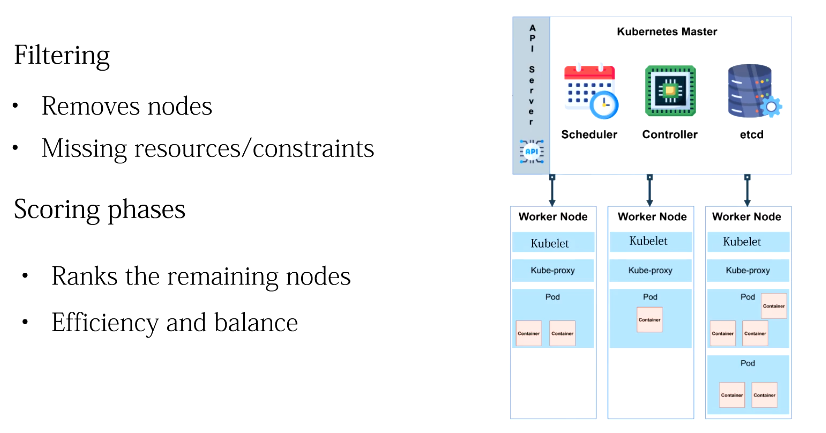
Filtering
Filtering removes nodes that cannot run the Pod.
A node might be rejected because:
-
It does not have sufficient CPU.
-
It does not have sufficient memory.
-
It does not satisfy a node selector.
-
It has incompatible taints.
-
Required affinity rules are not satisfied.
-
Other scheduling constraints prevent placement.
Scoring
After unsuitable nodes have been removed, Kubernetes scores the remaining suitable nodes.
The scheduler uses these scores to determine the most appropriate placement for the Pod.
Once the scheduler selects a node, the Pod's node assignment is recorded through the API server and persisted as part of the cluster state.
Kubelet Acts on the Decision
Once a Pod has been assigned to a worker node, the kubelet running on that node observes the assignment.
Kubelet does not decide which node should run the Pod. That decision has already been made by the scheduler.
Instead, kubelet acts on the desired state.
It works with the container runtime to:
-
Pull the required container images
-
Create the required containers
-
Start the containers
-
Monitor their state
-
Report Pod and node status
This creates a clear separation of responsibilities.
The scheduler decides where the Pod should run, while the kubelet ensures that the Pod runs on the selected node.
Health Checks and Decision Making
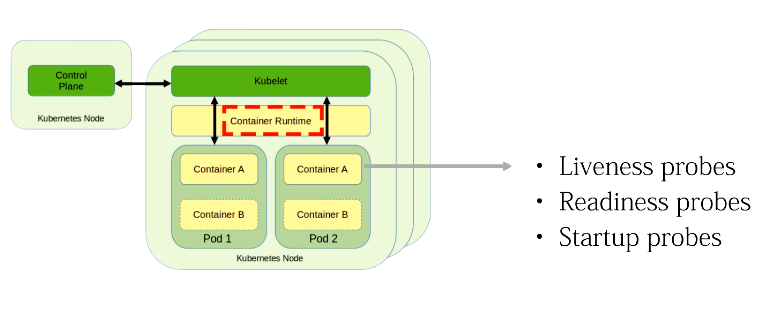 Health checks also play an important role in Kubernetes.
Kubernetes supports several types of probes.
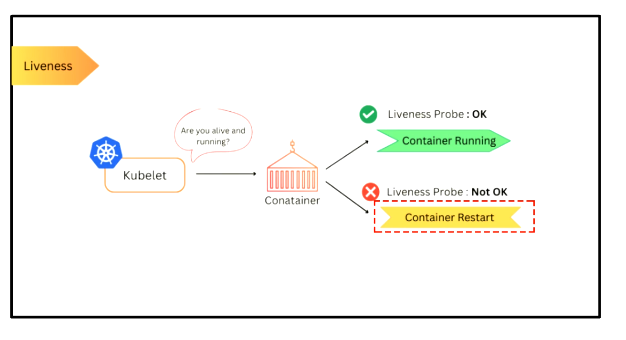
Liveness Probe
A liveness probe determines whether a container is functioning correctly.
If a liveness probe repeatedly fails, kubelet can restart the container.
Readiness Probe
A readiness probe determines whether an application is ready to receive traffic.
If the readiness probe fails, the Pod is removed from the set of ready Service endpoints until it becomes ready again.
Startup Probe
A startup probe determines whether an application has successfully started.
This is particularly useful for applications that require a long initialization period.
Together, these probes provide information that Kubernetes can use when maintaining workloads and directing traffic.
If a probe fails then kubernetes decides whether to restart the container or replace the pod
Kubernetes Events
Kubernetes also generates events that provide information about activity inside the cluster.
Events can describe situations such as:
-
A Pod being scheduled
-
A container starting
-
An image being pulled
-
A health probe failing
-
A volume failing to mount
-
A Pod failing to schedule
-
A container repeatedly restarting
Events are particularly valuable when troubleshooting Kubernetes problems because they help explain why a resource is in its current state.
For example:
kubectl get events
or:
kubectl describe pod my-pod
can reveal important information about what Kubernetes has been attempting to do.
Resource Requests and Limits
Resource management is another important factor in Kubernetes decision making.
Pods can define CPU and memory requests and limits.
A resource request describes how much of a resource Kubernetes should reserve when considering placement.
For example:
resources:
  requests:
    memory: "256Mi"
    cpu: "250m"
  limits:
    memory: "512Mi"
    cpu: "500m"
The scheduler uses resource requests when determining whether a node has sufficient capacity to run a Pod.
Resource limits define constraints on how much CPU or memory a container may use.
Resource availability can also affect decisions such as Pod eviction when a node experiences resource pressure.
Policies Influence Kubernetes Decisions
Kubernetes decisions are also influenced by policies and configuration rules.
RBAC
Role-Based Access Control (RBAC) determines who is permitted to perform particular actions within the Kubernetes API.
Admission Controllers
Admission controllers can validate, modify, or reject requests before Kubernetes accepts them.
Taints and Tolerations
Taints and tolerations influence which Pods are permitted to run on particular nodes.
Affinity Rules
Node affinity and Pod affinity/anti-affinity can influence or restrict where workloads are placed.
All these mechanisms contribute to how Kubernetes determines what actions are allowed and where workloads should run.
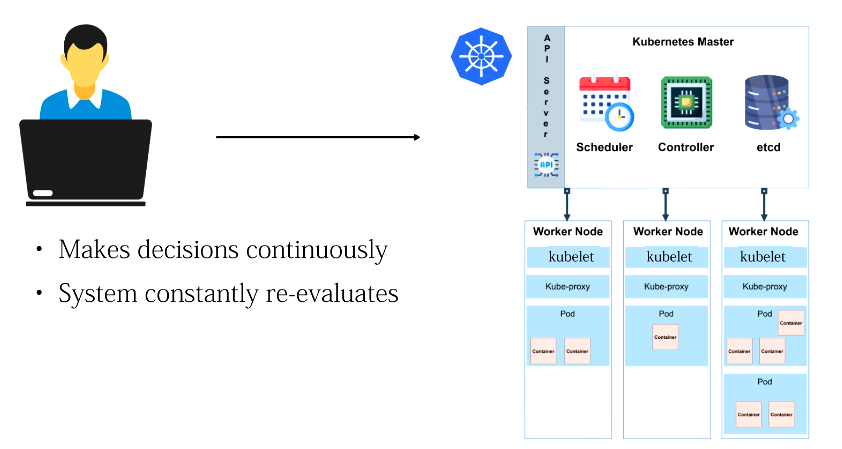
Kubernetes Makes Decisions Continuously
One of the most important concepts to understand is that Kubernetes does not make a decision once and then forget about it.
The cluster is continuously re-evaluated.
Even after Kubernetes successfully reaches the desired state, controllers continue checking whether that state remains correct.
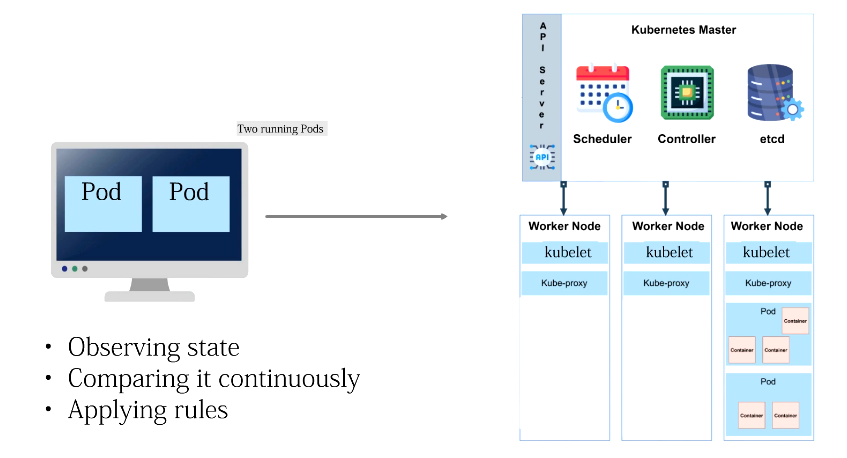
Consider a Deployment that requires two Pods:
Desired State
     |
     v
2 Pods Required
     |
     v
2 Pods Running
     |
     v
Everything OK
Now imagine one Pod crashes:
2 Pods Required
     |
     v
1 Pod Running
     |
     v
Controller Detects Difference
     |
     v
Replacement Pod Created
     |
     v
Scheduler Selects Node
     |
     v
Kubelet Starts Pod
     |
     v
2 Pods Running Again
Kubernetes has automatically returned the application to its desired state.
A Complete Example
Imagine that you create a Deployment specifying that your application should always have two running Pods.
The process begins when the configuration is submitted to the API server.
The desired state is persisted in etcd.
A controller observes that two Pods are required but currently none exist.
It therefore works through the Kubernetes API to create the required Pods.
The Pods initially have no worker nodes assigned to them.
The scheduler notices the unscheduled Pods and evaluates the available nodes.
After filtering unsuitable nodes and scoring the remaining candidates, the scheduler assigns each Pod to an appropriate worker node.
The kubelet on each selected node sees the assignment and works with the container runtime to start the required containers.
Eventually, Kubernetes reaches the desired state:
Desired: 2 Pods
Actual:  2 Pods
Status:  Healthy
Later, one of the Pods fails.
The actual state is now:
Desired: 2 Pods
Actual:  1 Pod
Status:  Difference detected
The controller detects that the actual state no longer matches the desired state and initiates the creation of a replacement Pod.
The scheduler selects a suitable node, and kubelet starts the replacement workload.
Kubernetes returns to:
Desired: 2 Pods
Actual:  2 Pods
Status:  Healthy
No administrator had to manually start the replacement Pod.
The Kubernetes Decision-Making Flow
The overall process can be represented as:
User / kubectl
      |
      v
  API Server
      |
      v
     etcd
      |
      v
 Controllers
      |
      v
Desired State vs Actual State
      |
      v
   Scheduler
      |
      v
 Worker Node
      |
      v
   Kubelet
      |
      v
Container Runtime
      |
      v
     Pods
      |
      v
Status / Health Information
      |
      +-------------------->
             API Server
Key Point
Kubernetes decision making is based on a continuous process of observation, comparison, and reconciliation.
The API server provides the central API, etcd persists cluster state, controllers continuously reconcile desired and actual state, the scheduler determines where Pods should run, and kubelet makes sure assigned workloads are running on worker nodes.
The most important concept to remember is:
You tell Kubernetes what state you want. Kubernetes continuously works to make the actual state match that desired state.
This continuous reconciliation process is one of the fundamental ideas behind Kubernetes and is what allows a cluster to automatically respond to failures and changes.
Comments (0)
There are no comments yet. Be the first to comment.
Log in or register to leave a comment. all comments are subject to admin approval