peter (admin) -

Understanding kubeconfig and kubectl
In this section, we will learn what kubeconfig is and how it allows kubectl to securely connect to a Kubernetes cluster and communicate with the control plane.
kubeconfig is a configuration file that tells kubectl how to connect to a Kubernetes cluster. It stores cluster information, user credentials, contexts, namespaces, and security settings in one place.
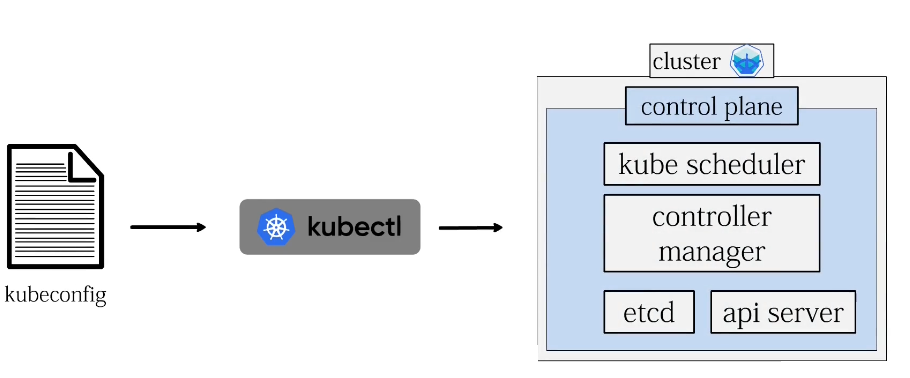
kubectl reads this file to determine:
-
Which Kubernetes cluster to connect to
-
Which user credentials to use
-
Which namespace should be used by default
-
How to securely authenticate with the API server
Without kubeconfig, kubectl would not know how to communicate with the Kubernetes control plane.
What Is kubeconfig?
A kubeconfig file contains the connection information required by Kubernetes clients such as kubectl.
It usually contains several main sections:
clusters
users
contexts
current-context
These sections work together to define how kubectl connects to Kubernetes.
The basic relationship looks like this:
kubectl
   |
   v
kubeconfig
   |
   +---- Cluster
   |
   +---- User
   |
   +---- Context
   |
   +---- Namespace
   |
   v
Kubernetes API Server
Check the KUBECONFIG Environment Variable
The first thing we can check is whether the KUBECONFIG environment variable has been set manually.
Run:
echo $KUBECONFIG
The echo command displays the value stored in an environment variable.
If nothing is displayed, it means that KUBECONFIG has not been set manually for the current user.
This is completely normal.
When the KUBECONFIG variable is not set, kubectl automatically looks for its default configuration file.
Default kubeconfig Location
On Linux, the default kubeconfig file is normally:
~/.kube/config
The tilde:
~
represents the current user's home directory.
For example, if the user is called ifsol, the full path would be:
/home/ifsol/.kube/config
Minikube normally creates and updates this file automatically when the cluster is created.
Verify the kubeconfig File
We can confirm that the file exists with:
ls -l ~/.kube/config
The output will show information such as:
-
File permissions
-
Owner
-
Group
-
File size
-
Modification date
-
File location
For example:
-rw------- 1 ifsol ifsol 1234 ... /home/ifsol/.kube/config
The important point is that the current user has permission to read the file.
kubectl needs access to this file in order to obtain the information required to connect to Kubernetes.
What Does kubeconfig Contain?
The kubeconfig file normally contains information about:
Clusters
The clusters section contains information about Kubernetes clusters.
This can include:
-
Cluster name
-
API server address
-
Certificate authority information
For example:
clusters:
  - name: minikube
    cluster:
      server: https://192.168.x.x:8443
      certificate-authority: /path/to/ca.crt
The server entry tells kubectl where the Kubernetes API server is located.
Users
The users section contains authentication information.
This may include:
-
Client certificates
-
Client keys
-
Tokens
-
Authentication plugins
For example:
users:
  - name: minikube
    user:
      client-certificate: /path/to/client.crt
      client-key: /path/to/client.key
These credentials allow kubectl to authenticate securely with the Kubernetes API server.
Contexts
A context combines three important pieces of information:
-
Cluster
-
User
-
Namespace
A context tells kubectl:
Use this cluster, with these credentials, and optionally use this namespace by default.
For example:
contexts:
  - name: minikube
    context:
      cluster: minikube
      user: minikube
      namespace: default
This makes it easy to manage multiple Kubernetes environments from the same computer.
Check the Current Context
To see which context kubectl is currently using, run:
kubectl config current-context
For a Minikube environment, the output will normally be:
minikube
This tells us that kubectl is currently configured to communicate with the Minikube cluster.
Checking the current context is particularly important when working with multiple Kubernetes environments.
For example, you may eventually have:
development
testing
staging
production
minikube
Running a command against the wrong context could modify the wrong cluster.
Understanding Contexts
A context can be thought of as an active Kubernetes connection profile.
For example:
Context: minikube
      |
      +---- Cluster: minikube
      |
      +---- User: minikube
      |
      +---- Namespace: default
When kubectl uses this context, it knows exactly which cluster and credentials to use.
List All Available Contexts
To see all contexts stored in kubeconfig, run:
kubectl config get-contexts
The output will look similar to:
CURRENT   NAME       CLUSTER    AUTHINFO    NAMESPACE
*         minikube   minikube   minikube    default
Let's look at each column.
CURRENT
A star:
*
shows which context is currently active.
NAME
The NAME column displays the name of the context.
For example:
minikube
CLUSTER
The CLUSTER column shows which Kubernetes cluster entry the context uses.
AUTHINFO
The AUTHINFO column shows which user or credential entry is being used.
NAMESPACE
The NAMESPACE column shows the default namespace associated with that context.
If no namespace is explicitly configured, Kubernetes normally uses:
default
Why Contexts Are Useful
Contexts become especially useful when managing multiple Kubernetes clusters.
Imagine you have:
minikube
development
testing
production
All of these cluster connections can be stored in the same kubeconfig file.
You can then switch between them without manually changing API server addresses or authentication details.
This makes kubeconfig a central part of Kubernetes administration.
Switch to a Specific Context
To select a context, use:
kubectl config use-context minikube
If successful, kubectl will respond with something similar to:
Switched to context "minikube".
This confirms that Minikube is now the active context.
Any following kubectl commands will use that context.
For example:
kubectl get nodes
will now query the Minikube cluster.
Be Careful When Switching Contexts
Context switching is very useful, but it is also something to treat carefully.
For example:
kubectl config use-context production
followed by:
kubectl delete deployment my-app
would run the delete operation against the production cluster.
For this reason, it is good practice to check the active context before performing important operations:
kubectl config current-context
View the kubeconfig Configuration
To display the Kubernetes configuration known to kubectl, run:
kubectl config view
This displays the configuration in YAML format.
You will see sections such as:
apiVersion: v1
kind: Config

clusters:
  ...

contexts:
  ...

current-context: minikube

users:
  ...
This gives us a clear view of how kubectl is configured.
The Cluster Section
Inside the cluster section, you may see information similar to:
clusters:
  - cluster:
      certificate-authority: /home/user/.minikube/ca.crt
      server: https://192.168.x.x:8443
    name: minikube
The important fields are:
server
certificate-authority
The server value contains the HTTPS address of the Kubernetes API server.
The certificate authority information allows kubectl to verify that it is communicating with the trusted Kubernetes cluster.
Secure Communication with the API Server
kubectl normally communicates with the Kubernetes API server over HTTPS.
The basic flow looks like this:
kubectl
   |
   | Reads kubeconfig
   v
Cluster Address
User Credentials
Certificates
   |
   v
HTTPS Connection
   |
   v
Kubernetes API Server
This protects the communication between kubectl and the Kubernetes control plane.
The Context Section
The context section connects the cluster and user configuration together.
For example:
contexts:
  - context:
      cluster: minikube
      user: minikube
      namespace: default
    name: minikube
This means:
Context Name: minikube
Cluster:      minikube
User:         minikube
Namespace:    default
kubectl can therefore use a single context name instead of requiring us to specify all these settings for every command.
The User Section
The user section contains the credentials used to authenticate with Kubernetes.
For Minikube, you may see client certificate information similar to:
users:
  - name: minikube
    user:
      client-certificate: /home/user/.minikube/profiles/minikube/client.crt
      client-key: /home/user/.minikube/profiles/minikube/client.key
The client certificate and private key allow kubectl to prove its identity to the Kubernetes API server.
The API server can then authenticate the user before determining whether the requested action is allowed.
Authentication and Authorization
It is useful to distinguish between these two concepts.
Authentication answers:
Who are you?
For example, the API server may verify a client certificate.
Authorization answers:
What are you allowed to do?
After authentication succeeds, Kubernetes can apply authorization policies such as RBAC.
The process looks like:
kubectl
   |
   v
Authentication
   |
   v
Authorization
   |
   v
API Request Allowed or Rejected
kubectl in Action
Suppose we run:
kubectl get nodes
kubectl performs several steps behind the scenes.
kubectl get nodes
       |
       v
Read kubeconfig
       |
       v
Find current context
       |
       v
Find cluster address
       |
       v
Find credentials
       |
       v
Connect to API server with HTTPS
       |
       v
Authenticate
       |
       v
Request node information
       |
       v
API server responds
       |
       v
Display results
This all happens automatically.
Useful kubeconfig Commands
Check the current context:
kubectl config current-context
List all contexts:
kubectl config get-contexts
Switch context:
kubectl config use-context minikube
View the configuration:
kubectl config view
Check the location of the default configuration:
ls -l ~/.kube/config
Check whether KUBECONFIG is set:
echo $KUBECONFIG
Using a Different kubeconfig File
If you want kubectl to use a specific configuration file, you can set the KUBECONFIG environment variable.
For example:
export KUBECONFIG=/home/user/my-cluster-config
Now:
kubectl get nodes
will use that configuration file.
Alternatively, you can specify a kubeconfig file for a single command:
kubectl --kubeconfig=/home/user/my-cluster-config get nodes
This becomes useful when managing several clusters or keeping separate configuration files.
How Everything Fits Together
The full relationship between kubectl, kubeconfig, and Kubernetes can be represented as:
                     kubeconfig
                         |
          +--------------+--------------+
          |              |              |
          v              v              v
       Cluster          User          Context
          |              |              |
          +--------------+--------------+
                         |
                         v
                      kubectl
                         |
                         | HTTPS
                         v
                 Kubernetes API Server
                         |
            +------------+------------+
            |            |            |
            v            v            v
          Nodes         Pods       Deployments
kubeconfig provides the connection information.
kubectl uses that information to securely communicate with the Kubernetes API server.
The API server then allows us to manage Kubernetes resources according to our permissions.
Key Points
The most important things to remember are:
-
kubeconfig stores Kubernetes connection information.
-
The default Linux location is usually
~/.kube/config. -
kubectl reads kubeconfig automatically.
-
A cluster entry defines the Kubernetes API server.
-
A user entry defines authentication information.
-
A context combines a cluster, user, and optional namespace.
-
kubectl config current-contextshows the active context. -
kubectl config get-contextslists available contexts. -
kubectl config use-contextswitches between contexts. -
kubectl config viewdisplays the current configuration. -
kubectl normally communicates securely with the Kubernetes API server over HTTPS.
In simple terms:
kubeconfig tells kubectl where the Kubernetes cluster is, who you are, and which connection settings to use.
Once kubectl has this information, it can securely communicate with the Kubernetes control plane and allow us to manage resources such as Nodes, Pods, Deployments, Services, and other Kubernetes objects.
Comments (0)
There are no comments yet. Be the first to comment.
Log in or register to leave a comment. all comments are subject to admin approval