peter (admin) -

Kubernetes Pod Restart Policies
Introduction
Here we will learn how Kubernetes restart policies control what happens to a container when it fails or stops unexpectedly.
For this demonstration, we are already logged into both the control-plane node and the worker node.
We will create Pods with different restart policies and intentionally cause their containers to fail. This allows us to see how Kubernetes responds to container failures.
Understanding Restart Policies
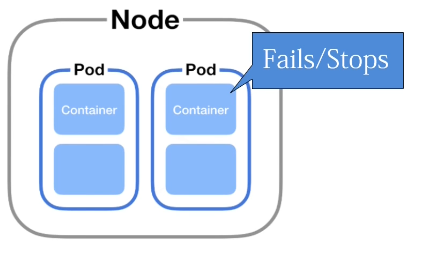 A Pod's
restartPolicy determines whether the kubelet should restart a container after it terminates.
The standard Pod restart policies are:
-
Always -
OnFailure -
Never
In this exercise, we will first examine Never and then compare it with OnFailure.
Restart Policy: Never
For our first demonstration, we use a YAML configuration because it allows us to clearly define how the Pod should behave when a failure occurs.
Instead of creating a separate YAML file, we can use cat with a here document and pipe the configuration directly into kubectl.
Creating the Pod
Run:
cat <<EOF | kubectl apply -f -
apiVersion: v1
kind: Pod
metadata:
  name: restart-never
spec:
  restartPolicy: Never
  containers:
    - name: crash
      image: busybox
      command:
        - sh
        - -c
        - exit 1
EOF
Let's examine the important parts of this configuration.
We begin with:
apiVersion: v1
kind: Pod
apiVersion: v1 tells Kubernetes that we are using the core API version.
kind: Pod tells Kubernetes that we want to create a Pod.
Pod Metadata
In the metadata section, we give the Pod the name:
metadata:
  name: restart-never
This allows us to easily identify and monitor the Pod during the failure test.
Setting restartPolicy to Never
Inside the Pod specification, we define:
restartPolicy: Never
This means that if a container inside the Pod terminates, Kubernetes will not automatically restart that container.
This is useful for our demonstration because we want to observe what happens when a container fails without automatic recovery.
Creating a Container That Intentionally Fails
Inside the containers section, we define a container named:
crash
which uses:
busybox
BusyBox is a small Linux image that is commonly useful for testing and troubleshooting.
We then execute:
sh -c "exit 1"
An exit code of 1 indicates failure.
The container therefore starts and immediately exits with an error.
Combined with:
restartPolicy: Never
our Pod starts its container, the container immediately fails, and Kubernetes does not restart it.
Checking the Pod Status
Check the Pod:
kubectl get pods
You should see something similar to:
NAME            READY   STATUS   RESTARTS   AGE
restart-never   0/1     Error    0          10s
The important values are:
STATUS:   Error
RESTARTS: 0
Error tells us that the container terminated unsuccessfully.
The restart count of 0 confirms that Kubernetes has not restarted the container.
This is the behavior we expect because the Pod has:
restartPolicy: Never
Describing the Failed Pod
We can examine the Pod in greater detail:
kubectl describe pod restart-never
Under the container information, we should find that the BusyBox container executed our command and terminated.
Its state should contain information similar to:
State:          Terminated
Reason:         Error
Exit Code:      1
Restart Count:  0
The exit code of 1 confirms that the container failed as intended.
The restart count of 0 confirms that Kubernetes did not restart it.
Examining the Events
The Events section of kubectl describe provides information about the creation and startup of the Pod.
It may show that Kubernetes:
-
Scheduled the Pod onto a worker node.
-
Pulled or found the BusyBox image.
-
Created the container.
-
Started the container.
The container then exits because of our exit 1 command.
Because the restart policy is Never, the kubelet leaves the terminated container stopped rather than restarting it.
Restart Policy: OnFailure
Now we create another Pod to observe different restart behavior.
This time, we use:
restartPolicy: OnFailure
OnFailure tells Kubernetes to restart the container when it terminates unsuccessfully.
Creating the OnFailure Pod
Run:
cat <<EOF | kubectl apply -f -
apiVersion: v1
kind: Pod
metadata:
  name: restart-onfailure
spec:
  restartPolicy: OnFailure
  containers:
    - name: crash
      image: busybox
      command:
        - sh
        - -c
        - exit 1
EOF
Again, we are creating a Pod containing a BusyBox container.
The container executes:
exit 1
so it intentionally terminates with an error.
The important difference is:
restartPolicy: OnFailure
Because the process exits unsuccessfully, the kubelet attempts to restart the container.
Watching the Pod
We can observe this behavior in real time using:
kubectl get pods -w
Or watch only this particular Pod:
kubectl get pod restart-onfailure -w
Initially, the container starts and immediately exits.
Because the restart policy is OnFailure, Kubernetes attempts to start it again.
The restart count therefore begins increasing.
You may see output similar to:
NAME                READY   STATUS             RESTARTS   AGE
restart-onfailure   0/1     Error              0          2s
restart-onfailure   0/1     Error              1          4s
restart-onfailure   0/1     CrashLoopBackOff   2          15s
The exact output and timing can vary, but the important point is that the restart count increases.
CrashLoopBackOff
Because our container executes:
exit 1
every time it starts, every restart fails again.
The cycle becomes:
Container starts
      |
      v
   exit 1
      |
      v
Container fails
      |
      v
OnFailure policy
      |
      v
Container restarted
      |
      v
   exit 1
      |
      v
Container fails again
      |
      v
CrashLoopBackOff
Eventually, you will normally see:
CrashLoopBackOff
This does not mean Kubernetes has permanently stopped trying to restart the container.
Instead, Kubernetes introduces an increasing delay between restart attempts. This prevents a failing container from being restarted continuously in an extremely rapid loop.
The restart count will continue to increase as additional restart attempts occur.
Comparing Never and OnFailure
The difference between the two examples can be summarized as:
restartPolicy: Never

Container starts
      |
      v
   exit 1
      |
      v
Container stops
      |
      v
No restart
With OnFailure:
restartPolicy: OnFailure

Container starts
      |
      v
   exit 1
      |
      v
Container fails
      |
      v
Container restarted
      |
      v
Fails again
      |
      v
Restart attempts continue
The key difference is therefore what the kubelet does after the container terminates unsuccessfully.
With:
restartPolicy: Never
the failed container remains terminated.
With:
restartPolicy: OnFailure
the kubelet restarts the container when it terminates with a failure.
If the container repeatedly fails immediately after starting, Kubernetes backs off between restart attempts and the Pod may display the familiar:
CrashLoopBackOff
status.
This demonstrates how Kubernetes restart policies allow us to control the behavior of containers after they terminate and how Kubernetes can automatically attempt to recover workloads from container failures.
Comments (0)
There are no comments yet. Be the first to comment.
Log in or register to leave a comment. all comments are subject to admin approval